Expand LVM (Logical Volume Mapping) in Linux
12 February 2025
Linux CLI StorageWhenever we are working with an LVM system, there are several steps you have to do to expand a single-PV single-VG environment...
Find the physical volume (PV) by running lsblk to list the block storage:
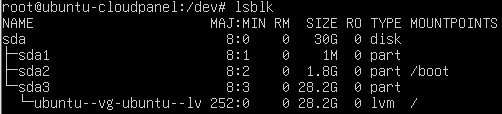
See the free logical space by running df -h to get the disk free in human readable format (GB):
- Resize the hard drive itself
- Resize the partition that is your LVM VG member:
sudo growpart /dev/sda 3 - Resize the PV if it's not already resized. This can be done sometimes automatically during partition growth so you may not need to do this but it never hurts:
sudo pvresize /dev/sda3 - Resize the LVs themselves:
sudo lvresize -l +100%FREE /dev/mapper/ubuntu--vg-ubuntu--lv - Resize the file system itself to use the larger space:
sudo resize2fs /dev/mapper/ubuntu--vg-ubuntu--lv